sqlplus / as sysdba is not working
apt-lnxtst-01:~ # /etc/init.d/nscd stop
Shutting down Name Service Cache Daemon done
sqlplus / as sysdba will hang , if nscd service is not running on your server
( if you are using ldap )
apt-lnxtst-01:~ # su - oracle
oracle@apt-lnxtst-01:~> sqlplus / as sysdba
SQL*Plus: Release 10.2.0.4.0 - Production on Tue Apr 12 12:37:46 2011
Copyright (c) 1982, 2007, Oracle. All Rights Reserved.
----------------this screen will stay like this --------------------------
--- hanged hanged hanged hanged hanged hanged hanged hanged hanged hanged hanged ----------
apt-lnxtst-01:/aptus/www/jtime76 # /etc/init.d/nscd start
Starting Name Service Cache Daemon done
now this will work
open a new terminal then
# su - oracle
oracle@apt-lnxtst-01:~> sqlplus / as sysdba
SQL*Plus: Release 10.2.0.4.0 - Production on Tue Apr 12 12:41:57 2011
Copyright (c) 1982, 2007, Oracle. All Rights Reserved.
Connected to:
Oracle Database 10g Enterprise Edition Release 10.2.0.4.0 - Production
With the Partitioning, OLAP, Data Mining and Real Application Testing options
Tuesday, 12 April 2011

Friday, 8 April 2011
How to run SQLplus as different user non oracle user on unix
How to run SQLplus on non oracle user ?
jtime76@apt-lnxtst-01:~> cat .bashrc
export ORACLE_BASE=/opt/oracle
export ORACLE_HOME=/opt/oracle/product/10.2
export ORACLE_SID=orcl
export PATH=$ORACLE_HOME/bin:$PATH:.
export LIBXCB_ALLOW_SLOPPY_LOCK=1
export TZ=GMT
# export LD_LIBRARY_PATH=$LD_LIBRARY_PATH:$ORACLE_HOME/lib32
export LD_LIBRARY_PATH=$ORACLE_HOME/lib
jtime76@apt-lnxtst-01:~> ls -ltr /opt/oracle/product/10.2
total 58
-rwxr-xr-x 1 oracle oinstall 0 2005-06-07 17:50 root.sh.old
drwxr-x--- 3 oracle oinstall 72 2010-09-09 09:39 wwg
so add user name in the group . My user jtime
cat /etc/group
uucp:x:14:
wheel:x:10:
www:x:8:
xok:x:41:
users:x:100:
oinstall:!:6001:boadmin,jtime <<<<<<<<<<<<----
boadmin:!:6003:
mysql:!:106:
zimbra:!:6004:
postdrop:!:6005:
mailman:!:67:
sophosav:!:6006:
ldap:!:70:
winbind:!:161:
named:!:44:
jtime79:!:6007:
jtime76@apt-lnxtst-01:~> env|grep ora
LD_LIBRARY_PATH=/opt/oracle/product/10.2/lib
ORACLE_BASE=/opt/oracle
ORA_NLS32=/opt/oracle/product/10.2/nls/data
ORACLE_HOME=/opt/oracle/product/10.2
jtime76@apt-lnxtst-01:~> cat .bashrc
export ORACLE_BASE=/opt/oracle
export ORACLE_HOME=/opt/oracle/product/10.2
export ORACLE_SID=orcl
export PATH=$ORACLE_HOME/bin:$PATH:.
export LIBXCB_ALLOW_SLOPPY_LOCK=1
export TZ=GMT
# export LD_LIBRARY_PATH=$LD_LIBRARY_PATH:$ORACLE_HOME/lib32
export LD_LIBRARY_PATH=$ORACLE_HOME/lib
jtime76@apt-lnxtst-01:~> ls -ltr /opt/oracle/product/10.2
total 58
-rwxr-xr-x 1 oracle oinstall 0 2005-06-07 17:50 root.sh.old
drwxr-x--- 3 oracle oinstall 72 2010-09-09 09:39 wwg
so add user name in the group . My user jtime
cat /etc/group
uucp:x:14:
wheel:x:10:
www:x:8:
xok:x:41:
users:x:100:
oinstall:!:6001:boadmin,jtime <<<<<<<<<<<<----
boadmin:!:6003:
mysql:!:106:
zimbra:!:6004:
postdrop:!:6005:
mailman:!:67:
sophosav:!:6006:
ldap:!:70:
winbind:!:161:
named:!:44:
jtime79:!:6007:
jtime76@apt-lnxtst-01:~> env|grep ora
LD_LIBRARY_PATH=/opt/oracle/product/10.2/lib
ORACLE_BASE=/opt/oracle
ORA_NLS32=/opt/oracle/product/10.2/nls/data
ORACLE_HOME=/opt/oracle/product/10.2
Wednesday, 6 April 2011
Anuj's glogin.sql file
https://anuj-singh.blogspot.com/2021_07_20_archive.html
location of file is cd $ORACLE_HOME/sqlplus/admin
Oracle glogin.sql file
glogin file ......
set verify off termout off head off feed off
col add new_value welcome
select UTL_INADDR.GET_HOST_NAME||':'||UTL_INADDR.GET_HOST_ADDRESS "add" from dual ;
column global_name new_value gname
set termout off
select UTL_INADDR.GET_HOST_NAME||'@'||lower(SYS_CONTEXT('USERENV','CURRENT_USER'))||'-Sql>' global_name from dual ;
set sqlprompt 'gname'
set verify on termout on head on feed on
prompt ************************************
prompt WELCOME TO &&welcome
prompt ************************************
prompt
set echo off serveroutput on size 100000 line 100 trims on
==============================================================================================
or
cat glogin.sql
--
-- Copyright (c) 1988, 2005, Oracle. All Rights Reserved.
--
-- NAME
-- glogin.sql
--
-- DESCRIPTION
-- SQL*Plus global login "site profile" file
--
-- Add any SQL*Plus commands here that are to be executed when a
-- user starts SQL*Plus, or uses the SQL*Plus CONNECT command.
--
-- USAGE
-- This script is automatically run
--
set termout off
set long 5000
set pagesize 9999 linesize 180 longchunksize 180 arraysize 100 num 10
define gname=idle
column global_name new_value gname
--select lower(user) || '@' || sys_context('USERENV','INSTANCE_NAME') global_name from dual;
select lower(sys_context('USERENV','DATABASE_ROLE'))||':'||lower(user) || '@' || sys_context('USERENV','INSTANCE_NAME') global_name from dual;
select lower(sys_context('USERENV','DATABASE_ROLE'))||':'||lower(user) || '@' || sys_context('USERENV','DB_UNIQUE_NAME') || '-' ||sys_context('USERENV','INSTANCE_NAME') global_name from dual;
set sqlprompt '&gname sqlplus> '
-- host title sqlplus connected to &gname
alter session set nls_date_format='dd-mm-yy hh24:mi';
set tab off
set termout on
===========================
Output ..
primary:sys@rac-rac2 sqlplus>
====================
login.sql
set termout off long 5000 pagesize 9999 linesize 180 longchunksize 180 arraysize 100 num 10
define gname=idle
column global_name new_value gname
--select lower(user) || '@' || sys_context('USERENV','INSTANCE_NAME') global_name from dual;
select lower(sys_context('USERENV','DATABASE_ROLE'))||':'||lower(user) || '@' || sys_context('USERENV','INSTANCE_NAME') global_name from dual;
select lower(sys_context('USERENV','DATABASE_ROLE'))||':'||lower(user) || '@' || sys_context('USERENV','DB_UNIQUE_NAME') || '-' ||sys_context('USERENV','INSTANCE_NAME') global_name
from dual;
set sqlprompt '&gname> '
host title sqlplus connected to &gname
alter session set nls_date_format='dd-mm-yy hh24:mi';
set tab off
set termout on
----
output
primary:sys@anuj-vihaan>
Monday, 4 April 2011
Install Oracle Instant Client for unix / Linux x86-64
Oracle Instant Client installation on unix 64 bit
Install Oracle thin client
Download following rpm from oracle website
oracle-instantclient11.2-basic-11.2.0.2.0.x86_64.rpm
oracle-instantclient11.2-devel-11.2.0.2.0.x86_64.rpm
oracle-instantclient11.2-sqlplus-11.2.0.2.0.x86_64.rpm
Instant Client Downloads site
http://www.oracle.com/technetwork/database/features/instant-client/index-097480.html
http://www.oracle.com/technetwork/topics/linuxx86-64soft-092277.html
apt-amd-02:/home/anujs/Downloads # rpm -ivh oracle-instantclient11.2-basic-11.2.0.2.0.x86_64.rpm
Preparing... ########################################### [100%]
1:oracle-instantclient11.########################################### [100%]
apt-amd-02:/usr # rpm -ql oracle-instantclient11.2-basic
/usr/lib/oracle/11.2/client64/bin/adrci
/usr/lib/oracle/11.2/client64/bin/genezi
/usr/lib/oracle/11.2/client64/lib/libclntsh.so.11.1
/usr/lib/oracle/11.2/client64/lib/libnnz11.so
/usr/lib/oracle/11.2/client64/lib/libocci.so.11.1
/usr/lib/oracle/11.2/client64/lib/libociei.so
/usr/lib/oracle/11.2/client64/lib/libocijdbc11.so
/usr/lib/oracle/11.2/client64/lib/ojdbc5.jar
/usr/lib/oracle/11.2/client64/lib/ojdbc6.jar
/usr/lib/oracle/11.2/client64/lib/xstreams.jar
apt-amd-02:/home/anujs/Downloads # rpm -ivh oracle-instantclient11.2-sqlplus-11.2.0.2.0.x86_64.rpm
Preparing... ########################################### [100%]
1:oracle-instantclient11.########################################### [100%]
apt-amd-02:/home/anujs/Downloads # rpm -ql oracle-instantclient11.2-sqlplus
/usr/bin/sqlplus64
/usr/lib/oracle/11.2/client64/bin/sqlplus
/usr/lib/oracle/11.2/client64/lib/glogin.sql
/usr/lib/oracle/11.2/client64/lib/libsqlplus.so
/usr/lib/oracle/11.2/client64/lib/libsqlplusic.so
when you install following rpm you will get following error ....
apt-amd-02:/home/anujs/Downloads # rpm -ivh oracle-instantclient-devel-10.2.0.4-1.x86_64.rpm
error: Failed dependencies:
oracle-instantclient-basic >= 10.2.0.4 is needed by oracle-instantclient-devel-10.2.0.4-1.x86_64
So use --nodeps for this rpm
apt-amd-02:/home/anujs/Downloads # rpm -ivh oracle-instantclient-devel-11.1.0.1-1.x86_64.rpm --nodeps
Preparing... ########################################### [100%]
1:oracle-instantclient-de########################################### [100%]
Create tnsnames.ora file in /etc
apt-amd-02:/usr/lib/oracle/11.2/client64/bin # cat /etc/tnsnames.ora
anujc =
(DESCRIPTION =
(ADDRESS_LIST =
(ADDRESS = (PROTOCOL = TCP)(HOST = 192.168.2.251)(PORT = 1521))
)
(CONNECT_DATA =
(sid = orcl)
)
)
set following variable or add into .bash_profile file
export TNS_ADMIN=/etc
export ORACLE_HOME=/usr/lib/oracle/11.2
export LD_LIBRARY_PATH=$ORACLE_HOME/client64/lib
PATH=$PATH:$HOME/bin:/sbin:$ORACLE_HOME/client64/bin
apt-amd-02:/usr/lib/oracle/11.2/client64/bin # pwd
/usr/lib/oracle/11.2/client64/bin
apt-amd-02:/usr/lib/oracle/11.2/client64/bin # sqlplus scott/tiger@anujc
SQL*Plus: Release 11.2.0.2.0 Production on Mon Apr 4 15:39:31 2011
Copyright (c) 1982, 2010, Oracle. All rights reserved.
Connected to:
Oracle Database 11g Enterprise Edition Release 11.2.0.1.0 - 64bit Production
With the Partitioning, OLAP, Data Mining and Real Application Testing options
SQL> select * from tab;
TNAME TABTYPE CLUSTERID
------------------------------ ------- ----------
BONUS TABLE
DEPT TABLE
EMP TABLE
SALGRADE TABLE
T TABLE
Now connect to different database .
apt-amd-02:/usr/lib/oracle/11.2/client64/bin # sqlplus scott/tiger@anuj
SQL*Plus: Release 11.2.0.2.0 Production on Mon Apr 4 16:45:38 2011
Copyright (c) 1982, 2010, Oracle. All rights reserved.
Connected to:
Oracle Database 10g Enterprise Edition Release 10.2.0.3.0 - Production
With the Partitioning, OLAP and Data Mining options
SQL> exit
Disconnected from Oracle Database 10g Enterprise Edition Release 10.2.0.3.0 - Production
With the Partitioning, OLAP and Data Mining options
apt-amd-02:/usr/lib/oracle/11.2/client64/bin # cat /etc/tnsnames.ora
anujc =
(DESCRIPTION =
(ADDRESS_LIST =
(ADDRESS = (PROTOCOL = TCP)(HOST = 192.168.2.251)(PORT = 1521))
)
(CONNECT_DATA =
(sid = orcl)
)
)
anuj =
(DESCRIPTION =
(ADDRESS_LIST =
(ADDRESS = (PROTOCOL = TCP)(HOST = 192.168.2.210)(PORT = 1521))
)
(CONNECT_DATA =
(SID = anujdb)
)
)
Install Oracle thin client
Download following rpm from oracle website
oracle-instantclient11.2-basic-11.2.0.2.0.x86_64.rpm
oracle-instantclient11.2-devel-11.2.0.2.0.x86_64.rpm
oracle-instantclient11.2-sqlplus-11.2.0.2.0.x86_64.rpm
Instant Client Downloads site
http://www.oracle.com/technetwork/database/features/instant-client/index-097480.html
http://www.oracle.com/technetwork/topics/linuxx86-64soft-092277.html
apt-amd-02:/home/anujs/Downloads # rpm -ivh oracle-instantclient11.2-basic-11.2.0.2.0.x86_64.rpm
Preparing... ########################################### [100%]
1:oracle-instantclient11.########################################### [100%]
apt-amd-02:/usr # rpm -ql oracle-instantclient11.2-basic
/usr/lib/oracle/11.2/client64/bin/adrci
/usr/lib/oracle/11.2/client64/bin/genezi
/usr/lib/oracle/11.2/client64/lib/libclntsh.so.11.1
/usr/lib/oracle/11.2/client64/lib/libnnz11.so
/usr/lib/oracle/11.2/client64/lib/libocci.so.11.1
/usr/lib/oracle/11.2/client64/lib/libociei.so
/usr/lib/oracle/11.2/client64/lib/libocijdbc11.so
/usr/lib/oracle/11.2/client64/lib/ojdbc5.jar
/usr/lib/oracle/11.2/client64/lib/ojdbc6.jar
/usr/lib/oracle/11.2/client64/lib/xstreams.jar
apt-amd-02:/home/anujs/Downloads # rpm -ivh oracle-instantclient11.2-sqlplus-11.2.0.2.0.x86_64.rpm
Preparing... ########################################### [100%]
1:oracle-instantclient11.########################################### [100%]
apt-amd-02:/home/anujs/Downloads # rpm -ql oracle-instantclient11.2-sqlplus
/usr/bin/sqlplus64
/usr/lib/oracle/11.2/client64/bin/sqlplus
/usr/lib/oracle/11.2/client64/lib/glogin.sql
/usr/lib/oracle/11.2/client64/lib/libsqlplus.so
/usr/lib/oracle/11.2/client64/lib/libsqlplusic.so
when you install following rpm you will get following error ....
apt-amd-02:/home/anujs/Downloads # rpm -ivh oracle-instantclient-devel-10.2.0.4-1.x86_64.rpm
error: Failed dependencies:
oracle-instantclient-basic >= 10.2.0.4 is needed by oracle-instantclient-devel-10.2.0.4-1.x86_64
So use --nodeps for this rpm
apt-amd-02:/home/anujs/Downloads # rpm -ivh oracle-instantclient-devel-11.1.0.1-1.x86_64.rpm --nodeps
Preparing... ########################################### [100%]
1:oracle-instantclient-de########################################### [100%]
Create tnsnames.ora file in /etc
apt-amd-02:/usr/lib/oracle/11.2/client64/bin # cat /etc/tnsnames.ora
anujc =
(DESCRIPTION =
(ADDRESS_LIST =
(ADDRESS = (PROTOCOL = TCP)(HOST = 192.168.2.251)(PORT = 1521))
)
(CONNECT_DATA =
(sid = orcl)
)
)
set following variable or add into .bash_profile file
export TNS_ADMIN=/etc
export ORACLE_HOME=/usr/lib/oracle/11.2
export LD_LIBRARY_PATH=$ORACLE_HOME/client64/lib
PATH=$PATH:$HOME/bin:/sbin:$ORACLE_HOME/client64/bin
apt-amd-02:/usr/lib/oracle/11.2/client64/bin # pwd
/usr/lib/oracle/11.2/client64/bin
apt-amd-02:/usr/lib/oracle/11.2/client64/bin # sqlplus scott/tiger@anujc
SQL*Plus: Release 11.2.0.2.0 Production on Mon Apr 4 15:39:31 2011
Copyright (c) 1982, 2010, Oracle. All rights reserved.
Connected to:
Oracle Database 11g Enterprise Edition Release 11.2.0.1.0 - 64bit Production
With the Partitioning, OLAP, Data Mining and Real Application Testing options
SQL> select * from tab;
TNAME TABTYPE CLUSTERID
------------------------------ ------- ----------
BONUS TABLE
DEPT TABLE
EMP TABLE
SALGRADE TABLE
T TABLE
Now connect to different database .
apt-amd-02:/usr/lib/oracle/11.2/client64/bin # sqlplus scott/tiger@anuj
SQL*Plus: Release 11.2.0.2.0 Production on Mon Apr 4 16:45:38 2011
Copyright (c) 1982, 2010, Oracle. All rights reserved.
Connected to:
Oracle Database 10g Enterprise Edition Release 10.2.0.3.0 - Production
With the Partitioning, OLAP and Data Mining options
SQL> exit
Disconnected from Oracle Database 10g Enterprise Edition Release 10.2.0.3.0 - Production
With the Partitioning, OLAP and Data Mining options
apt-amd-02:/usr/lib/oracle/11.2/client64/bin # cat /etc/tnsnames.ora
anujc =
(DESCRIPTION =
(ADDRESS_LIST =
(ADDRESS = (PROTOCOL = TCP)(HOST = 192.168.2.251)(PORT = 1521))
)
(CONNECT_DATA =
(sid = orcl)
)
)
anuj =
(DESCRIPTION =
(ADDRESS_LIST =
(ADDRESS = (PROTOCOL = TCP)(HOST = 192.168.2.210)(PORT = 1521))
)
(CONNECT_DATA =
(SID = anujdb)
)
)
How to set CONNECT_DATA with SID in oracle for tnsnames.ora file
tnsnames.ora CONNECT_DATA SID
anuj2 =
(DESCRIPTION =
(ADDRESS_LIST =
(ADDRESS = (PROTOCOL = TCP)(HOST = 192.168.1.210)(PORT = 1521))
)
(CONNECT_DATA =
(SID = anujdb)
)
)
anuj3 =
(DESCRIPTION =
(ADDRESS_LIST =
(ADDRESS = (PROTOCOL = TCP)(HOST = 192.168.1.210)(PORT = 1521))
)
(CONNECT_DATA =
(ORACLE_SID = anujdb)
)
)
oracle@novagenesis$ tnsping anuj2
TNS Ping Utility for Linux: Version 10.2.0.3.0 - Production on 04-APR-2011 11:31:19
Copyright (c) 1997, 2006, Oracle. All rights reserved.
Used parameter files:
/aptus/oracle/product/10g/network/admin/sqlnet.ora
Used TNSNAMES adapter to resolve the alias
Attempting to contact (DESCRIPTION = (ADDRESS_LIST = (ADDRESS = (PROTOCOL = TCP)(HOST = 192.168.2.210)(PORT = 1521))) (CONNECT_DATA = (SID = anujdb)))
OK (0 msec)
SQL> connect scott/tiger@anuj2
Connected.
SQL> exit
Disconnected from Oracle Database 10g Enterprise Edition Release 10.2.0.3.0 - Production
With the Partitioning, OLAP and Data Mining options
anuj2 =
(DESCRIPTION =
(ADDRESS_LIST =
(ADDRESS = (PROTOCOL = TCP)(HOST = 192.168.1.210)(PORT = 1521))
)
(CONNECT_DATA =
(SID = anujdb)
)
)
anuj3 =
(DESCRIPTION =
(ADDRESS_LIST =
(ADDRESS = (PROTOCOL = TCP)(HOST = 192.168.1.210)(PORT = 1521))
)
(CONNECT_DATA =
(ORACLE_SID = anujdb)
)
)
oracle@novagenesis$ tnsping anuj2
TNS Ping Utility for Linux: Version 10.2.0.3.0 - Production on 04-APR-2011 11:31:19
Copyright (c) 1997, 2006, Oracle. All rights reserved.
Used parameter files:
/aptus/oracle/product/10g/network/admin/sqlnet.ora
Used TNSNAMES adapter to resolve the alias
Attempting to contact (DESCRIPTION = (ADDRESS_LIST = (ADDRESS = (PROTOCOL = TCP)(HOST = 192.168.2.210)(PORT = 1521))) (CONNECT_DATA = (SID = anujdb)))
OK (0 msec)
SQL> connect scott/tiger@anuj2
Connected.
SQL> exit
Disconnected from Oracle Database 10g Enterprise Edition Release 10.2.0.3.0 - Production
With the Partitioning, OLAP and Data Mining options
Saturday, 2 April 2011
Install squirrel thin client on unix for Oracle
Install squirrel client for oracle
squirrel client for oracle on unix
Thin client (squirrel) for Oracle
First download the squirrel client in this site http://www.squirrelsql.org/
squirrel-sql-3.2.1-install.jar
apt-amd-02:/home/anujs/Downloads # which java
/usr/bin/java
To Install jar file
apt-amd-02:/home/anujs/Downloads # java -jar squirrel-sql-3.2.1-install.jar
then go to this dir , you will able to see this
apt-amd-02:/home/anujs/Downloads # cd /usr/local/squirrel-sql-3.2.1
apt-amd-02:/usr/local/squirrel-sql-3.2.1 # ls -ltr
total 1924
-rw-r--r-- 1 root root 400 2010-12-29 21:56 update-log4j.properties
-rw-r--r-- 1 root root 308 2010-12-29 21:56 log4j.properties
-rw-r--r-- 1 root root 23 2010-12-29 21:56 addpath.bat
-rw-r--r-- 1 root root 1922111 2010-12-29 23:59 squirrel-sql.jar
drwxr-xr-x 2 root root 24 2011-04-01 11:26 update
drwxr-xr-x 2 root root 71 2011-04-01 11:26 icons
drwxr-xr-x 5 root root 4096 2011-04-01 11:26 doc
drwxr-xr-x 2 root root 4096 2011-04-01 11:26 lib
drwxr-xr-x 10 root root 4096 2011-04-01 11:26 plugins
-rw-r--r-- 1 root root 3244 2011-04-01 11:26 squirrel-sql.bat
-rwxr-xr-x 1 root root 4529 2011-04-01 11:26 squirrel-sql.sh
drwxr-xr-x 2 root root 53 2011-04-01 11:26 Uninstaller
-rw-r--r-- 1 root root 4587 2011-04-01 11:26 .installationinformation
then download this jar file from oracle site
http://www.oracle.com/technetwork/database/enterprise-edition/jdbc-112010-90769.html
-rw-r--r-- 1 anujs users 1988051 2011-04-01 12:38 ojdbc6.jar
copy this file to in this dir
cp ojdbc6.jar /usr/local/squirrel-sql-3.2.1/lib/
To run squirrel client
apt-amd-02:/usr/local/squirrel-sql-3.2.1 # ./squirrel-sql.sh
jdbc:oracle:thin:@server:1521:database_name
jdbc:oracle:thin:@192.168.2.251:1521:orcl
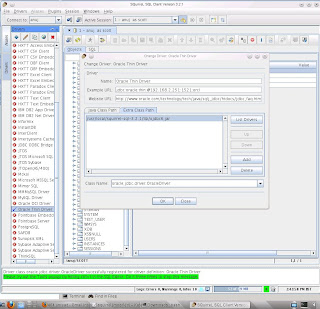
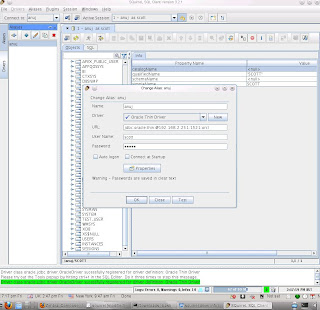
squirrel client for oracle on unix
Thin client (squirrel) for Oracle
First download the squirrel client in this site http://www.squirrelsql.org/
squirrel-sql-3.2.1-install.jar
apt-amd-02:/home/anujs/Downloads # which java
/usr/bin/java
To Install jar file
apt-amd-02:/home/anujs/Downloads # java -jar squirrel-sql-3.2.1-install.jar
then go to this dir , you will able to see this
apt-amd-02:/home/anujs/Downloads # cd /usr/local/squirrel-sql-3.2.1
apt-amd-02:/usr/local/squirrel-sql-3.2.1 # ls -ltr
total 1924
-rw-r--r-- 1 root root 400 2010-12-29 21:56 update-log4j.properties
-rw-r--r-- 1 root root 308 2010-12-29 21:56 log4j.properties
-rw-r--r-- 1 root root 23 2010-12-29 21:56 addpath.bat
-rw-r--r-- 1 root root 1922111 2010-12-29 23:59 squirrel-sql.jar
drwxr-xr-x 2 root root 24 2011-04-01 11:26 update
drwxr-xr-x 2 root root 71 2011-04-01 11:26 icons
drwxr-xr-x 5 root root 4096 2011-04-01 11:26 doc
drwxr-xr-x 2 root root 4096 2011-04-01 11:26 lib
drwxr-xr-x 10 root root 4096 2011-04-01 11:26 plugins
-rw-r--r-- 1 root root 3244 2011-04-01 11:26 squirrel-sql.bat
-rwxr-xr-x 1 root root 4529 2011-04-01 11:26 squirrel-sql.sh
drwxr-xr-x 2 root root 53 2011-04-01 11:26 Uninstaller
-rw-r--r-- 1 root root 4587 2011-04-01 11:26 .installationinformation
then download this jar file from oracle site
http://www.oracle.com/technetwork/database/enterprise-edition/jdbc-112010-90769.html
-rw-r--r-- 1 anujs users 1988051 2011-04-01 12:38 ojdbc6.jar
copy this file to in this dir
cp ojdbc6.jar /usr/local/squirrel-sql-3.2.1/lib/
To run squirrel client
apt-amd-02:/usr/local/squirrel-sql-3.2.1 # ./squirrel-sql.sh
jdbc:oracle:thin:@server:1521:database_name
jdbc:oracle:thin:@192.168.2.251:1521:orcl


Friday, 1 April 2011
How to set SERVICE_NAME in oracle for tnsnames.ora
How to set SERVICE_NAME in oracle for tnsnames.ora file
col NAME format a30
col VALUE format a30
SQL> select name, value from v$parameter where name like 'service%' or name like 'db_domain' or name like 'db_unique_name' ;
NAME VALUE
------------------------------ ------------------------------
db_domain
service_names aptdb
db_unique_name aptdb
Default value DB_UNIQUE_NAME.DB_DOMAIN if defined
ANUJ =
(DESCRIPTION =
(ADDRESS_LIST =
(ADDRESS = (PROTOCOL = TCP)(HOST = 192.168.2.210)(PORT = 1521))
)
(CONNECT_DATA =
(SERVICE_NAME = APTDB) <<<<<------------- be="" br="" db_unique_name.db_domain="" default="" value="" will=""> )
)
=======================================================================
col NAME format a30
col VALUE format a30
select name, value from v$parameter where name like 'service%' or name like 'db_domain' or name like 'db_unique_name'
NAME VALUE
------------------------------ ------------------------------
db_domain anuj.co.uk
service_names orcl.anuj.co.uk
db_unique_name orcl
default value DB_UNIQUE_NAME.DB_DOMAIN
ORCL =
(DESCRIPTION =
(ADDRESS = (PROTOCOL = TCP)(HOST = apt-amd-02.anuj.co.uk)(PORT = 1521))
(CONNECT_DATA =
(SERVER = DEDICATED)
(SERVICE_NAME = orcl.anuj.co.uk) <<------default be="" br="" db_unique_name.db_domain="" value="" will=""> )
)
anuj1 =
(DESCRIPTION =
(ADDRESS = (PROTOCOL = TCP)(HOST = 192.168.2.251)(PORT = 1521))
(CONNECT_DATA =
(SERVER = DEDICATED)
(SERVICE_NAME = orcl.anuj.co.uk) <<<--default be="" br="" db_unique_name.db_domain="" value="" will=""> )
)
===================================
Example file for listener.ora
oracle@novagenesis$ cat listener.ora
# listener.ora Network Configuration File: /opt/oracle/product/10g/network/admin/listener.ora
# Generated by Oracle configuration tools.
LISTENER =
(DESCRIPTION_LIST =
(DESCRIPTION =
(ADDRESS = (PROTOCOL = TCP)(HOST = 192.168.2.210 )(PORT = 1521))
)
)
#APTDB =
# (DESCRIPTION_LIST =
# (DESCRIPTION =
# (ADDRESS = (PROTOCOL = TCP)(HOST = 192.168.0.4 )(PORT = 1521))
# )
# )
# to enable trace file
#TRACE_LEVEL_CLIENT = SUPPORT
#TRACE_TIMESTAMP_CLIENT = ON
#TRACE_LEVEL_LISTENER=16
#TRACE_TIMESTAMP_LISTENER=TRUE
#TRACE_DIRECTORY_LISTENER=/opt/oracle/product/10g/network/admin
#TRACE_FILELEN_LISTENER=500000
#TRACE_FILENO_LISTENER=10
======================================================
you can find out variable name following way as well
SQL> select sys_context('userenv','SERVICE_NAME') from dual;
SQL> select sys_context('userenv','DB_NAME') from dual;
SQL> alter user sys identified by sys ;
User altered.
You have to connect sys user through tnsnames other wise you will get wrong result .
oracle@apt-amd-02:/opt/app/oracle/product/11.2/network/admin> sqlplus / as sysdba
SQL*Plus: Release 11.2.0.1.0 Production on Mon May 16 08:56:48 2011
Copyright (c) 1982, 2009, Oracle. All rights reserved.
Connected to:
Oracle Database 11g Enterprise Edition Release 11.2.0.1.0 - 64bit Production
With the Partitioning, OLAP, Data Mining and Real Application Testing options
SQL> select sys_context('userenv','SERVICE_NAME') from dual;
SYS_CONTEXT('USERENV','SERVICE_NAME')
--------------------------------------------------------------------------------
SYS$USERS
so connect this way .
SQL> Disconnected from Oracle Database 11g Enterprise Edition Release 11.2.0.1.0 - 64bit Production
With the Partitioning, OLAP, Data Mining and Real Application Testing options
oracle@apt-amd-02:/opt/app/oracle/product/11.2/network/admin> sqlplus sys/sys@anuj1 as sysdba
SQL*Plus: Release 11.2.0.1.0 Production on Mon May 16 08:25:23 2011
Copyright (c) 1982, 2009, Oracle. All rights reserved.
Connected to:
Oracle Database 11g Enterprise Edition Release 11.2.0.1.0 - 64bit Production
With the Partitioning, OLAP, Data Mining and Real Application Testing options
SQL> select sys_context('userenv','SERVICE_NAME') from dual;
SYS_CONTEXT('USERENV','SERVICE_NAME')
--------------------------------------------------------------------------------
orcl.ptus.co.uk
or
SQL> select ora_database_name from dual;
ORA_DATABASE_NAME
--------------------------------------------------------------------------------
ORCL.PTUS.CO.UK
oracle@apt-amd-02:/opt/app/oracle/product/11.2/network/admin> sqlplus sys/sys@anuj1 as sysdba
SQL*Plus: Release 11.2.0.1.0 Production on Mon May 16 08:25:23 2011
Copyright (c) 1982, 2009, Oracle. All rights reserved.
Connected to:
Oracle Database 11g Enterprise Edition Release 11.2.0.1.0 - 64bit Production
With the Partitioning, OLAP, Data Mining and Real Application Testing options
SQL> select sys_context('userenv','SERVICE_NAME') from dual;
SYS_CONTEXT('USERENV','SERVICE_NAME')
--------------------------------------------------------------------------------
orcl.ptus.co.uk
SQL> select ora_database_name from dual;
ORA_DATABASE_NAME
--------------------------------------------------------------------------------
ORCL.PTUS.CO.UK
SQL> show parameter name
NAME TYPE VALUE
------------------------------------ ----------- ------------------------------
db_file_name_convert string
db_name string orcl
db_unique_name string orcl
global_names boolean FALSE
instance_name string orcl
lock_name_space string
log_file_name_convert string
service_names string orcl.ptus.co.uk
SQL> show parameter domain
NAME TYPE VALUE
------------------------------------ ----------- ------------------------------
db_domain string ptus.co.uk
service_name = db_unique_name.db_domain
col NAME format a30
col VALUE format a30
SQL> select name, value from v$parameter where name like 'service%' or name like 'db_domain' or name like 'db_unique_name' ;
NAME VALUE
------------------------------ ------------------------------
db_domain
service_names aptdb
db_unique_name aptdb
Default value DB_UNIQUE_NAME.DB_DOMAIN if defined
ANUJ =
(DESCRIPTION =
(ADDRESS_LIST =
(ADDRESS = (PROTOCOL = TCP)(HOST = 192.168.2.210)(PORT = 1521))
)
(CONNECT_DATA =
(SERVICE_NAME = APTDB) <<<<<------------- be="" br="" db_unique_name.db_domain="" default="" value="" will=""> )
)
=======================================================================
col NAME format a30
col VALUE format a30
select name, value from v$parameter where name like 'service%' or name like 'db_domain' or name like 'db_unique_name'
NAME VALUE
------------------------------ ------------------------------
db_domain anuj.co.uk
service_names orcl.anuj.co.uk
db_unique_name orcl
default value DB_UNIQUE_NAME.DB_DOMAIN
ORCL =
(DESCRIPTION =
(ADDRESS = (PROTOCOL = TCP)(HOST = apt-amd-02.anuj.co.uk)(PORT = 1521))
(CONNECT_DATA =
(SERVER = DEDICATED)
(SERVICE_NAME = orcl.anuj.co.uk) <<------default be="" br="" db_unique_name.db_domain="" value="" will=""> )
)
anuj1 =
(DESCRIPTION =
(ADDRESS = (PROTOCOL = TCP)(HOST = 192.168.2.251)(PORT = 1521))
(CONNECT_DATA =
(SERVER = DEDICATED)
(SERVICE_NAME = orcl.anuj.co.uk) <<<--default be="" br="" db_unique_name.db_domain="" value="" will=""> )
)
===================================
Example file for listener.ora
oracle@novagenesis$ cat listener.ora
# listener.ora Network Configuration File: /opt/oracle/product/10g/network/admin/listener.ora
# Generated by Oracle configuration tools.
LISTENER =
(DESCRIPTION_LIST =
(DESCRIPTION =
(ADDRESS = (PROTOCOL = TCP)(HOST = 192.168.2.210 )(PORT = 1521))
)
)
#APTDB =
# (DESCRIPTION_LIST =
# (DESCRIPTION =
# (ADDRESS = (PROTOCOL = TCP)(HOST = 192.168.0.4 )(PORT = 1521))
# )
# )
# to enable trace file
#TRACE_LEVEL_CLIENT = SUPPORT
#TRACE_TIMESTAMP_CLIENT = ON
#TRACE_LEVEL_LISTENER=16
#TRACE_TIMESTAMP_LISTENER=TRUE
#TRACE_DIRECTORY_LISTENER=/opt/oracle/product/10g/network/admin
#TRACE_FILELEN_LISTENER=500000
#TRACE_FILENO_LISTENER=10
======================================================
you can find out variable name following way as well
SQL> select sys_context('userenv','SERVICE_NAME') from dual;
SQL> select sys_context('userenv','DB_NAME') from dual;
SQL> alter user sys identified by sys ;
User altered.
You have to connect sys user through tnsnames other wise you will get wrong result .
oracle@apt-amd-02:/opt/app/oracle/product/11.2/network/admin> sqlplus / as sysdba
SQL*Plus: Release 11.2.0.1.0 Production on Mon May 16 08:56:48 2011
Copyright (c) 1982, 2009, Oracle. All rights reserved.
Connected to:
Oracle Database 11g Enterprise Edition Release 11.2.0.1.0 - 64bit Production
With the Partitioning, OLAP, Data Mining and Real Application Testing options
SQL> select sys_context('userenv','SERVICE_NAME') from dual;
SYS_CONTEXT('USERENV','SERVICE_NAME')
--------------------------------------------------------------------------------
SYS$USERS
so connect this way .
SQL> Disconnected from Oracle Database 11g Enterprise Edition Release 11.2.0.1.0 - 64bit Production
With the Partitioning, OLAP, Data Mining and Real Application Testing options
oracle@apt-amd-02:/opt/app/oracle/product/11.2/network/admin> sqlplus sys/sys@anuj1 as sysdba
SQL*Plus: Release 11.2.0.1.0 Production on Mon May 16 08:25:23 2011
Copyright (c) 1982, 2009, Oracle. All rights reserved.
Connected to:
Oracle Database 11g Enterprise Edition Release 11.2.0.1.0 - 64bit Production
With the Partitioning, OLAP, Data Mining and Real Application Testing options
SQL> select sys_context('userenv','SERVICE_NAME') from dual;
SYS_CONTEXT('USERENV','SERVICE_NAME')
--------------------------------------------------------------------------------
orcl.ptus.co.uk
or
SQL> select ora_database_name from dual;
ORA_DATABASE_NAME
--------------------------------------------------------------------------------
ORCL.PTUS.CO.UK
oracle@apt-amd-02:/opt/app/oracle/product/11.2/network/admin> sqlplus sys/sys@anuj1 as sysdba
SQL*Plus: Release 11.2.0.1.0 Production on Mon May 16 08:25:23 2011
Copyright (c) 1982, 2009, Oracle. All rights reserved.
Connected to:
Oracle Database 11g Enterprise Edition Release 11.2.0.1.0 - 64bit Production
With the Partitioning, OLAP, Data Mining and Real Application Testing options
SQL> select sys_context('userenv','SERVICE_NAME') from dual;
SYS_CONTEXT('USERENV','SERVICE_NAME')
--------------------------------------------------------------------------------
orcl.ptus.co.uk
SQL> select ora_database_name from dual;
ORA_DATABASE_NAME
--------------------------------------------------------------------------------
ORCL.PTUS.CO.UK
SQL> show parameter name
NAME TYPE VALUE
------------------------------------ ----------- ------------------------------
db_file_name_convert string
db_name string orcl
db_unique_name string orcl
global_names boolean FALSE
instance_name string orcl
lock_name_space string
log_file_name_convert string
service_names string orcl.ptus.co.uk
SQL> show parameter domain
NAME TYPE VALUE
------------------------------------ ----------- ------------------------------
db_domain string ptus.co.uk
service_name = db_unique_name.db_domain
<------------- be="" br="" db_unique_name.db_domain="" default="" value="" will=""><------default be="" br="" db_unique_name.db_domain="" value="" will=""><--default be="" br="" db_unique_name.db_domain="" value="" will="">
<------------- be="" br="" db_unique_name.db_domain="" default="" value="" will=""><------default be="" br="" db_unique_name.db_domain="" value="" will=""><--default be="" br="" db_unique_name.db_domain="" value="" will="">***************************************************************************
<------------- be="" br="" db_unique_name.db_domain="" default="" value="" will=""><------default be="" br="" db_unique_name.db_domain="" value="" will=""><--default be="" br="" db_unique_name.db_domain="" value="" will="">
<------------- be="" br="" db_unique_name.db_domain="" default="" value="" will=""><------default be="" br="" db_unique_name.db_domain="" value="" will=""><--default be="" br="" db_unique_name.db_domain="" value="" will="">in Oracle 21c
u01/app/oracle/product/21.0.0/dbhome1
<------------- be="" br="" db_unique_name.db_domain="" default="" value="" will=""><------default be="" br="" db_unique_name.db_domain="" value="" will=""><--default be="" br="" db_unique_name.db_domain="" value="" will="">
<------------- be="" br="" db_unique_name.db_domain="" default="" value="" will=""><------default be="" br="" db_unique_name.db_domain="" value="" will=""><--default be="" br="" db_unique_name.db_domain="" value="" will="">
locate OraDB21Home1
locate -i oradb21
https://docs.oracle.com/en/database/oracle/oracle-database/21/netrf/local-naming-parameters-in-tns-ora-file.html#GUID-12C94B15-2CE1-4B98-9D0C-8226A9DDF4CB[grid@oragrid ~]$ cat /u01/app/oracle/homes/OraDB21Home1/network/admin/tnsnames.ora
# tnsnames.ora Network Configuration File: /u01/app/oracle/homes/OraDB21Home1/network/admin/tnsnames.ora
# Generated by Oracle configuration tools.
CDBORCL =
(DESCRIPTION =
(ADDRESS = (PROTOCOL = TCP)(HOST = oragrid.lan)(PORT = 1521))
(CONNECT_DATA =
(SERVER = DEDICATED)
(SERVICE_NAME = cdborcl)
)
)
LISTENER_CDBORCL =
(ADDRESS = (PROTOCOL = TCP)(HOST = oragrid.lan)(PORT = 1521))
# start-delta orcl
LISTENER_ORCL =
(ADDRESS = (PROTOCOL = TCP)(HOST = oragrid.lan)(PORT = 1521))
ORCL =
(DESCRIPTION =
(ADDRESS = (PROTOCOL = TCP)(HOST = oragrid.lan)(PORT = 1521))
(CONNECT_DATA =
(SERVER = DEDICATED)
(SERVICE_NAME = orcl.lan)
)
)
# end-delta orcl
# start-delta v14mpc
LISTENER_V14MPC =
(ADDRESS = (PROTOCOL = TCP)(HOST = oragrid.lan)(PORT = 1521))
V14MPC =
(DESCRIPTION =
(ADDRESS = (PROTOCOL = TCP)(HOST = oragrid.lan)(PORT = 1521))
(CONNECT_DATA =
(SERVER = DEDICATED)
(SERVICE_NAME = v14mpc)
)
)
PDB1=(DESCRIPTION=(ADDRESS=(PROTOCOL=tcp) (HOST=192.168.1.120) (PORT=1521))(CONNECT_DATA=(SERVICE_NAME=pdb1.localdomain)))
dbfs=(DESCRIPTION=(ADDRESS=(PROTOCOL=tcp) (HOST=192.168.1.106) (PORT=1521))(CONNECT_DATA=(SERVICE_NAME=ORCL)))
# end-delta v14mpc
Subscribe to:
Posts (Atom)
